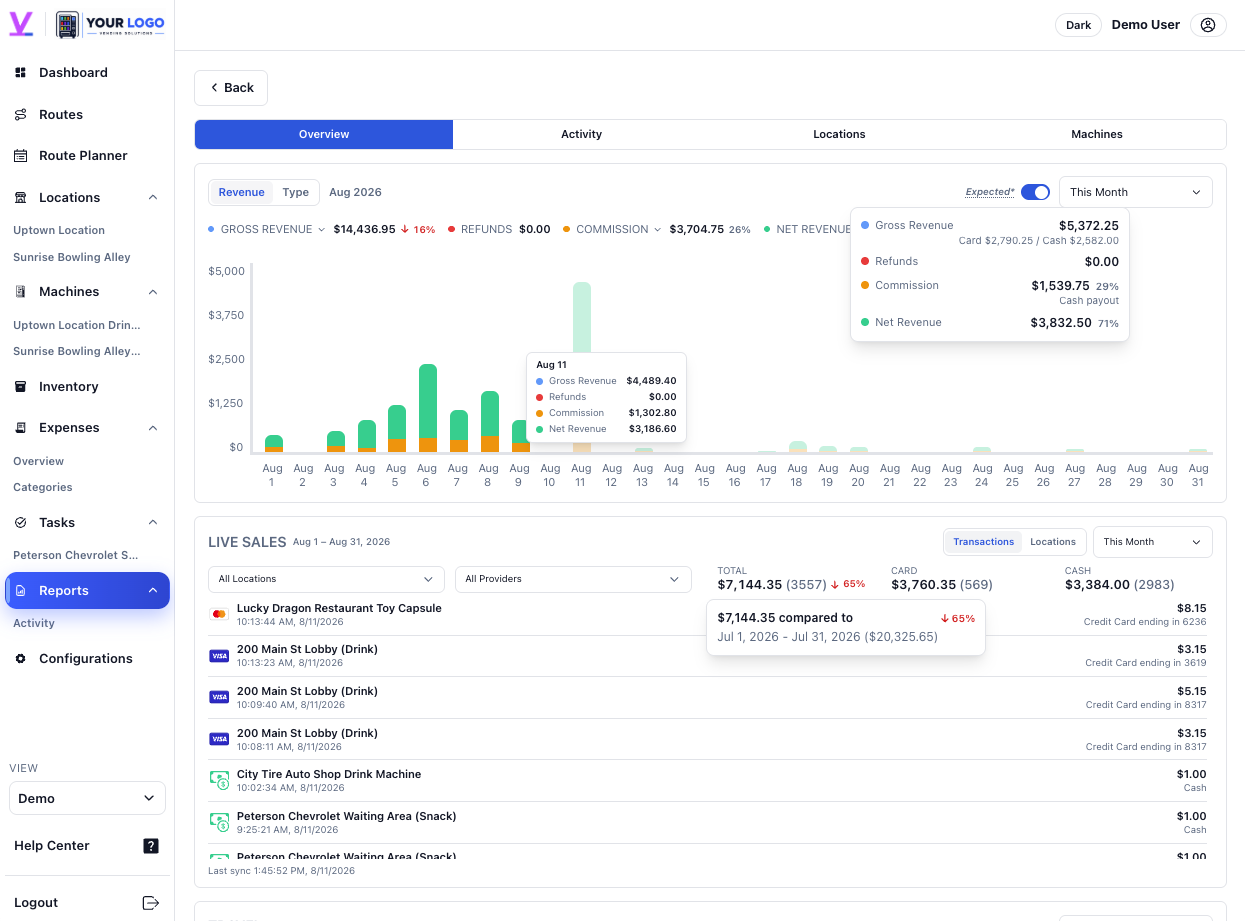
Keep gross revenue, refunds, commissions, and net revenue in one view.
Gross revenue$12,480
Refunds−$142
Net revenue$10,732
Reports & Analytics
Review revenue, commissions, refunds, sales, locations, and machine activity with the operating context close at hand.
Explore the numbers
See the result, the comparison, and the operating context together.
Keep gross revenue, refunds, commissions, and net revenue in one view.
Compare locations and machines with their operating activity close by.
See whether a change is a short-term event or part of a broader trend.
Share selected reports, activity, and commission information with the right location contacts.
Explore Location PartnersOne connected review
A report is easier to act on when sales, machines, locations, expenses, and service history remain connected. Vendistri gives owners a clearer path from a change in the numbers to the operation behind it.

FAQ
Reports can bring revenue, commissions, refunds, net results, locations, machines, and time periods into the same review workflow.
Supported sales activity can stay close to reporting so operators do not have to rebuild the operating picture separately.
Yes. Owners control which reports, activity, and commission information are shared with each location contact.